Table of Contents
The Custom AI function is the most flexible of the five AI actions. You write your own prompt and freely determine what the AI does with your data. Anything that doesn’t fit into the four standard functions (Summarize, Classify, OCR, Extract) can be implemented with Custom.
Typical Use Cases
- Translate: Automatically translate texts into another language.
- Rephrase: Rewrite texts in a different tone or style (e.g., formal, customer-friendly, simplified).
- Response Suggestions: Generate a draft response based on a customer inquiry.
- Evaluate: Assess texts according to your own criteria on a scale (e.g., relevance, quality, urgency).
- Generate: Create product descriptions, social media posts, or meta texts from bullet points.
- Correct: Automatically correct spelling and grammar errors in texts.
Prerequisites
- A table with at least one column whose content the AI should process.
- A Text column or Formatted Text column for the result.
Step-by-Step Guide
1. Create an Automation and Choose a Trigger
Create a new automation rule as described in the article Set Up AI Automation . Choose the appropriate trigger for your use case.
2. Add the “Call AI” Action
Click Add action and select Call AI.
3. Select the “Custom” Function
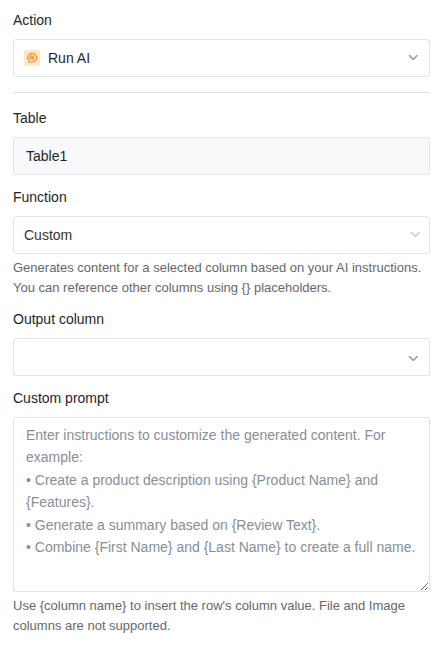
In the action settings, choose:
- Table: The table in which the AI should work.
- Function: Custom
4. Write the Prompt
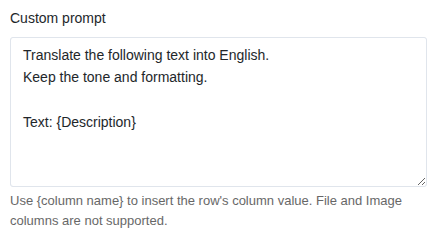
The prompt is the core of the Custom function. Here you formulate the instruction for the AI. Use {Column Name} in curly braces to insert the value of a column from the current row into the prompt.
Structure of a good prompt:
Translate the following text into English.
Keep the tone and formatting.

Text: {Description}
In this example, {Description} is replaced with the actual content of the “Description” column each time it runs.
5. Set the Result Column
Select the column where the AI result should be written. This must be of type Text or Formatted Text.
6. Save and Test
Click Save and test the automation with an entry. Check whether the result in the result column meets your expectations, and adjust the prompt if needed.
Prompt Examples for Common Tasks
Translate Texts
Translate the following text into French.
Keep technical terms and do not translate them.

Text: {Product Description}
Generate a Response Suggestion
Write a friendly and professional response
to the following customer inquiry. The response should
be no more than five sentences long.

Inquiry: {Customer Inquiry}
Rephrase Text
Rephrase the following text so that it is suitable
for a press release. Use a factual,
professional tone.

Original text: {Notes}
Evaluate Content
Rate the following text on a scale of 1 to 5
regarding its urgency. Reply only with the
number and a brief justification in one sentence.

Text: {Support Request}
Generate a Product Description
Create an appealing product description for an
online shop based on the following bullet points.
The description should be 50-80 words long.

Product name: {Name}
Features: {Features}
Target audience: {Target Audience}
Correct Spelling and Grammar
Correct spelling and grammar errors in the following
text. Do not change the content or phrasing.
Return only the corrected text.

Text: {Free Text}
Application Example: Translating Product Descriptions
Your product table contains German product descriptions. For the international online shop, you need English translations. Instead of translating each description manually, the AI should do it automatically.
Configuration:
- Trigger: When a row is added
- Function: Custom
- Prompt: Translate the following German text into English. Use an appealing tone suitable for an online shop. Keep product names and brand names as they are. Text: {Description DE}
- Result column: Description EN (Text column)
As soon as a new product with a German description is entered, the English translation automatically appears in the result column.
Tips for Good Prompts
- Be specific. “Write a good text” delivers unpredictable results. “Write a product description of 50-80 words in a friendly tone” is much better.
- Use column references. With
{Column Name}you can combine values from multiple columns in one prompt to provide context. - Define the output format. Should the result be a single sentence? A list? A number with justification? Specify it in the prompt.
- Test and iterate. Try the prompt with different entries. If the results don’t fit, adjust the wording.
- Write the prompt in the target language. If the result should be in English, write the prompt in English. This improves the quality of the results.