
Imagine opening your SeaTable base with 2,000 project entries. But instead of setting filters, configuring views, and writing formulas, you type:
“Which projects are overdue? Group them by responsible person.”
And the AI responds. Not with a vague guess, but with the real data from your base. Within seconds. This is not a vision of the future. It works right now with the new AI Chat Plugin in SeaTable.
But let us start from the beginning. Because AI in SeaTable is more than a chatbot.
So Far: AI Automations, the Invisible Helpers #
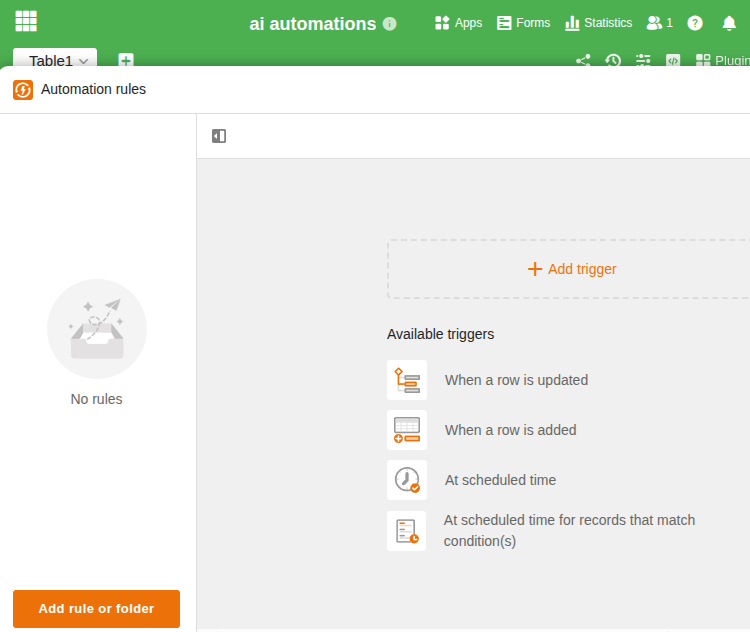
With SeaTable 6.0, we introduced AI automations. The principle: you define a task, and the AI handles it automatically in the background. Row by row, without you having to wait.
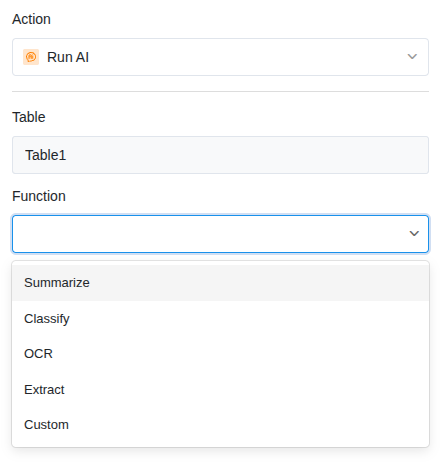
Four functions are available: Summarize, OCR, Extract, and Classify. In addition, there is a Custom Function that lets you define your own prompts.
What Does This Mean in Practice? #
- Invoice processing: Incoming invoices are read via OCR. Invoice number, date, amount, and sender are automatically placed in the correct columns — no manual data entry required.
- Support tickets: Incoming requests are analyzed, categorized, and assigned to the right team. Before a person even sees the request, it has already been sorted.
- Document summarization: A 20-page report is condensed to its key points in just a few seconds.
- Multilingual classification: Whether German, English, or French — the AI recognizes the language and categorizes the content correctly.
Where Do These Automations Run? #
On our own AI server in Germany, in the Hetzner data center. We operate our own language model that handles the processing. Your data never leaves our European infrastructure at any point.
For organizations that value GDPR compliance and data sovereignty (universities, research institutions, the public sector), this is decisive. No data flows to OpenAI, Google, or other US providers.
Enterprise customers receive AI credits included in their subscription.
Starting Now: The AI Chatbot. Talk to Your Data #
The automations are powerful, but they work according to fixed rules: one row in, one result out. But what if you have an open-ended question? What if you do not know which filter to set, or you need an analysis across your entire dataset?
That is what the AI Chat Plugin (Beta) is for, available from SeaTable 6.1.
How It Works #
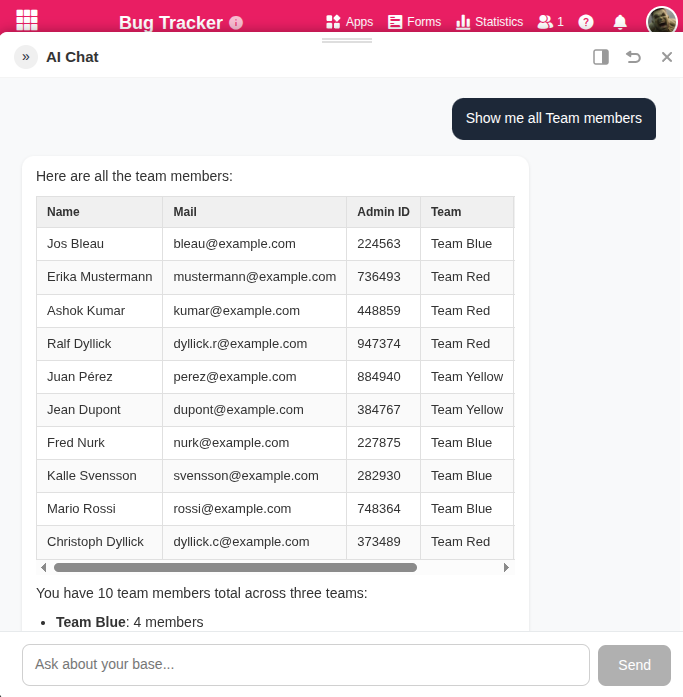
You open the chat in your base and ask your question in natural language. The AI knows the structure of your base (tables, columns, links) and queries the relevant data in a targeted manner. No export, no copy-paste, no explaining the table structure.
Some examples:
- “How many open deals do we have over 10,000 euros that have had no contact in 30 days?”
- “Summarize the support requests from the past week and show the most common topics.”
- “Create a follow-up entry in the activities table for each overdue task.”
Yes, the chatbot can not only read but also write: create rows, update them, link them, and delete them. All directly in your base.
How Is This Possible? #
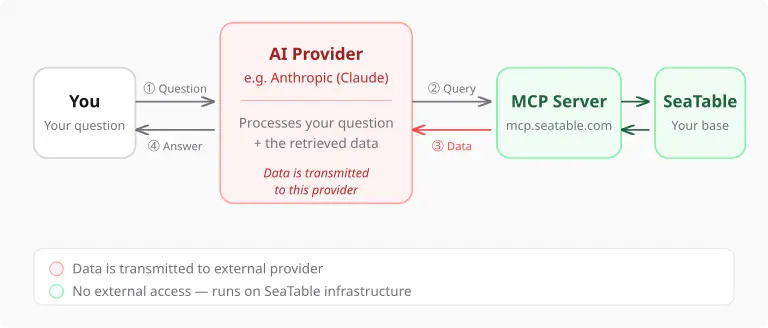
Behind the chatbot is the SeaTable MCP Server. MCP stands for Model Context Protocol, an open standard that enables AI models to actively interact with data sources. Instead of copying your data into the chat for the AI, the AI independently queries what it needs via MCP. Live, in real time, always up to date.
This fundamentally distinguishes our approach from solutions where you export data as CSV and paste it into a ChatGPT window. The chatbot works directly with your base — without detours and without loss of information.
Which Models Are Supported? #
The chatbot uses powerful AI models that can answer complex questions and work with your data in multiple steps. Currently we support:
- Anthropic Claude (Haiku and Sonnet)
- OpenAI (GPT-4o and GPT-4o mini)
- Mistral (Mistral Large and Mistral Small)
You bring your own API key and pay the token costs directly to the respective provider. This is transparent: you see exactly what each interaction costs and retain full control.
Why Two Approaches Instead of One? #
A fair question. Why not simply run everything through the chatbot?
The answer: because different tasks have different requirements.
| AI Automations | AI Chatbot | |
|---|---|---|
| Task | Defined: OCR, summarization, classification | Open-ended: questions, analyses, exploratory search |
| Interaction | In the background, automatic | Real-time dialog |
| Data | One row as input | Entire base as foundation |
| AI Model | Our server in Germany | Your model (Claude, OpenAI, or Mistral) |
| Data Sovereignty | Maximum: data stays on our infrastructure | You decide: data goes to the AI provider you choose |
| Cost | Included in Enterprise subscription | Token costs with the AI provider |
Both approaches complement each other. Use automations for recurring tasks that should run reliably in the background. Use the chatbot when you have questions that cannot be answered with a filter.
Your Data Stays Under Your Control #
Regardless of which approach you choose: control and security come first.
With automations, your data never leaves our European infrastructure. The language model runs on our own server in Germany.
With the chatbot, data is transmitted to the AI provider you have chosen. This is technically necessary so that the model can answer your questions. But you decide which provider that is.
And there is more: the AI Chat Plugin automatically distinguishes between read operations and destructive actions such as deletions or updates. Before data is changed, the plugin asks for your confirmation — what exactly will be changed and how many rows are affected. You can approve once, allow for the entire session, or decline. For particularly large result sets, the plugin also asks before the AI processes thousands of rows.
How to Get Started #
AI Automations #
Available for all Enterprise customers on SeaTable Cloud and for self-hosters from version 6.0. Create a new automation in your base, select an AI function (Summarize, OCR, Extract, Classify, or Custom), and define the input and output columns. The automation runs immediately for every new entry.
With SeaTable 6.1, we will make automations (including AI automations) available on a limited basis to Free and Plus customers as well.
You can find detailed instructions in our help section .
AI Chatbot #
From SeaTable 6.1, you can install the AI Chat Plugin (Beta) in your base. Enter your API key (Claude, OpenAI, or Mistral) in the plugin settings. Ask your first question. The chatbot automatically recognizes the structure of your base and will answer your question.
Outlook #
We are continuously working on expanding the AI capabilities in SeaTable:
- Improved API key management: Currently, the API key is stored in the plugin settings. For a future version, we are working on a centralized, more secure solution for managing API keys.
- AI Usage Tracking: A transparent overview of your token consumption.
- General AI Assistant: An assistant that lets you interact with multiple bases at once.
The possibilities for integrating AI into your daily work are growing rapidly. With SeaTable, you have the tools to benefit from them — without compromising on the control over your data.
TAGS: IT Processes Artificial Intelligence No Code & Low Code IT Security & Data Privacy